Product Description:
GoPro's CineForm Studio line of editing tools makes it easy to create professional quality clips from your GoPro content or prep for more advanced editing with Adobe Premier, Final Cut Pro, Sony Vegas, etc. From simple adjustments like slow motion control and clip trimming to more advanced color correction and 3D editing, CineForm Studio is a powerful tool for all GoPro content creators.
CineForm Studio features:
* Keep your GoPro cameras and BacPacs current with the latest software updates
* Easy playback and trimming of your GoPro video clips
* Frame rate adjustment for slow motion
* Quickly create videos from your timelapse photos
* Convert GoPro H.264 MP4s into editor friendly CineForm AVI or MOV files
* Apply real-time, non-destructive image adjustments that don't require re-rendering as changes are applied.
* Adjust video white balance, exposure, contrast, saturation and framing
* Support for ProTune and push-button color presets
* Process and adjust videos captured with the GoPro's 3D HERO System
* Export MP4/MOV for web sharing, including pre-formatted 3D content for YouTube and 3D TVs
* Preview 3D content on supported 3D monitors and TVs
* Support for other H.264 MOV/MP4 sources such as Canon and Nikon DSLRs

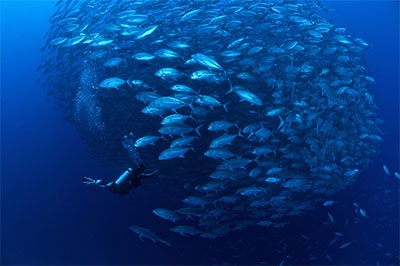
买的时候有送头带
谢谢LS。头带买了,但不知道怎么才能固定住。水里不比陆地。容易脱落的
带好头带再用头套套住头带,但真不建议带头,原因是拍摄时会遥来遥去,到观看时就头都晕了,视频拍摄秘诀就是要手定和移动要慢,越慢越好,
谢谢!明白了
头带另外有买的。还有胸带和腕带。
但是Go3的电池很不给力。
Go Pro潛水最好的用法是裝在DPV(推進器)上
畫面又穩定又流暢
gopro 水下真心有问题
白平衡一塌糊涂
认为一塌糊涂就用摄像机啦。各取所需嘛。
白平衡设计不是给潜水用的,水下吸色要用摄影灯补光。
下水要买个红色的滤片放潜水壳里.
谢谢
套买有原装的 头盔带的。 水下白平衡和聚焦 确实是有问题
你指的是gopro2还是3呢??
3是没有原装头盔带的,得另购
Gopro 不能变焦怎么整啊?
gopro3能变焦啊,速度还很理想呢,
未试过啊,你试试吧,等你报告。
有谁有3么,想知道黑色,白色,跟银色差别大么? 想进一台玩玩。
我有黑版3,分别就在配置上有差别,如果要功能最强当然用黑版3啦,
3的4K效果那里能看到
看完你的帖,我今天刚买了台黑色玩玩看。。。
共4500。^_^
哈哈 好的。坐等你发出评测来
红色镜片哪里有卖?装相机上吗?谢谢
我有个 gopro2 是我遥控飞机和遥控车模上用的 哈哈 不知道能不能再发挥一下“潜能” 哈哈哈 但是他们说原装的壳子拍出来很模糊。。。。淘宝上好像有个镜片可以让画面清晰很多 好像要近300人刀~~~~
想要在水下使用gopro,我们的方法是使用自拍棒,可以买国产的那种,我们买的包邮的才28元。而且自拍棒可以调节长度,有小洞穴什么的可以拉长找到里面。
仅供参考咯
ls在哪里买的?谢谢
http://detail.tmall.com/item.htm?id=13643291523&spm=0.0.0.36.JbVQKf
然后还得配一个这个转换台
http://tradearchive.taobao.com/trade/detail/tradeSnap.htm?spm=a1z09.2.9.169.E90EjD&tradeID=165838314430886
很强大,谢谢!
上用在SIPADAN用了3的SILVER EDITION,效果还好吧,特别是水不太深光照比较好的地方。白平衡可后期进行修复的,2K多的机器也不能硬要它发挥超出自己价值的作用。另外,充电问题可以自己带个移动电源,我就是每潜后进行补电的。
对银色的比较感兴趣,能否发几张照片看看?另外,操作使用上跟一般相机加防水壳比较有什么优劣?希不吝赐教
小女子也刚入了Gopro3黑色。正在调试中
都是入了3的有钱淫。。。
我去年11月入了2+潜水壳$250。就是每次都头戴下水的。不需要头套。先带好这个再带面镜,面镜后面的发代会帮助固定的。所以不必担心。
要注意的是视角会比你自己的高,注意调节角度,我这次有些就没拍上。
还有比较讨厌的是气泡问题。。。所以能腾出手来的建议配腕带或者自拍棒。
总体来说一句话:不后悔!
对焦没有任何问题。有条件的带个好的手电。白天也带上!
白平衡正在找软件修整。红膜没有尝试过,不知道有没有好的推荐或者效果视频?
可以试试GoPro的CineForm Studio, a powerful tool for GoPro users and it's free.
http://gopro.com/software-app/cineform-studio
Product Description:
GoPro's CineForm Studio line of editing tools makes it easy to create professional quality clips from your GoPro content or prep for more advanced editing with Adobe Premier, Final Cut Pro, Sony Vegas, etc. From simple adjustments like slow motion control and clip trimming to more advanced color correction and 3D editing, CineForm Studio is a powerful tool for all GoPro content creators.
CineForm Studio features:
* Keep your GoPro cameras and BacPacs current with the latest software updates
* Easy playback and trimming of your GoPro video clips
* Frame rate adjustment for slow motion
* Quickly create videos from your timelapse photos
* Convert GoPro H.264 MP4s into editor friendly CineForm AVI or MOV files
* Apply real-time, non-destructive image adjustments that don't require re-rendering as changes are applied.
* Adjust video white balance, exposure, contrast, saturation and framing
* Support for ProTune and push-button color presets
* Process and adjust videos captured with the GoPro's 3D HERO System
* Export MP4/MOV for web sharing, including pre-formatted 3D content for YouTube and 3D TVs
* Preview 3D content on supported 3D monitors and TVs
* Support for other H.264 MOV/MP4 sources such as Canon and Nikon DSLRs
月底也试试看
perfect! thx a lot!
对了,充电大家没有移动电源么?2充满一次可以至少2潜。 每次下水的间隙都可以充电啊。USB线带好。
早上刚到货,第一次发度看看。